- Home
- cách đào bitcoin
- Top 10+ Phần Mềm Quản Lý Máy Đào Bitcoin Hiệu Quả Nhất 2025 – Giám Sát Từ Xa & Tối Ưu Lợi Nhuận
 Nguyễn Đức Minh 20/02/2026
Top 10+ Phần Mềm Quản Lý Máy Đào Bitcoin Hiệu Quả Nhất 2025 – Giám Sát Từ Xa & Tối Ưu Lợi Nhuận
Phần mềm quản lý máy đào Bitcoin đóng vai trò then chốt trong việc tối ưu hóa hiệu suất khai thác, đặc biệt khi vận hành nhiều thiết bị cùng lúc. Với hơn 10 giải pháp quản lý chuyên nghiệp từ Awesome Miner, Hive OS đến NiceHash QuickMiner, người đào có thể giám sát từ xa, điều khiển tập trung và tự động tối ưu lợi nhuận thông qua các tính năng như profit switching, cảnh báo thông minh và overclocking tự động. Các phần mềm này hỗ trợ đa dạng phần cứng từ ASIC, GPU đến FPGA trên nhiều nền tảng Windows, Linux và macOS.
Bên cạnh việc lựa chọn phần mềm phù hợp, việc hiểu rõ các tính năng cốt lõi như giám sát từ xa qua dashboard trực quan, quản lý tập trung hàng trăm máy đào, và hệ thống cảnh báo bảo vệ phần cứng sẽ giúp thợ đào tối đa hóa ROI. Mỗi phần mềm có những điểm mạnh riêng: Awesome Miner xuất sắc trong quản lý quy mô lớn với hơn 50 mining software được hỗ trợ, Hive OS cung cấp hệ điều hành chuyên dụng với auto-tuning, trong khi NiceHash QuickMiner thân thiện với người mới bắt đầu.
Việc so sánh chi tiết về khả năng tương thích phần cứng, cấu trúc chi phí và độ dễ sử dụng giữa các nền tảng cũng quan trọng không kém. Phần mềm CLI như CGMiner và BFGMiner mang lại khả năng kiểm soát sâu cho người dùng kỹ thuật, trong khi các giải pháp GUI như EasyMiner và MultiMiner phù hợp với thợ đào ưa tiên sự đơn giản.
Sau đây, hãy cùng khám phá chi tiết về từng phần mềm quản lý máy đào Bitcoin hàng đầu, các tính năng thiết yếu cần có, cùng hướng dẫn cài đặt và tối ưu hóa để đạt hiệu suất khai thác tối đa trong năm 2025.
Phần Mềm Quản Lý Máy Đào Bitcoin Là Gì?
Phần mềm quản lý máy đào Bitcoin là công cụ chuyên biệt cho phép người dùng giám sát, điều khiển và tối ưu hóa hoạt động của một hoặc nhiều thiết bị đào cryptocurrency từ xa thông qua giao diện tập trung. Khác với phần mềm đào thông thường chỉ thực hiện việc khai thác, phần mềm quản lý tập trung vào việc giám sát hiệu suất, cảnh báo sự cố và tự động hóa các quy trình vận hành.
Để hiểu rõ hơn về vai trò của phần mềm quản lý, cần phân biệt hai loại công cụ trong hệ sinh thái mining. Phần mềm đào (mining software) như CGMiner, BFGMiner hay Excavator là các chương trình trực tiếp tương tác với phần cứng để thực hiện thuật toán băm, giải các bài toán mật mã và tìm block mới. Chúng hoạt động ở tầng thấp, giao tiếp trực tiếp với GPU, ASIC hoặc CPU để tạo ra hashrate. Trong khi đó, phần mềm quản lý (management software) như Awesome Miner, Hive OS hay Minerstat đóng vai trò như “bộ não điều hành” – nằm ở tầng cao hơn, cho phép người dùng giám sát nhiều phần mềm đào cùng lúc, chuyển đổi giữa các pool, điều chỉnh cấu hình và nhận cảnh báo qua nhiều kênh từ email đến Telegram.
Khi vận hành một farm đào với 10, 50 hay hàng trăm máy đào, việc kiểm tra từng thiết bị thủ công trở nên phi thực tế. Phần mềm quản lý giải quyết vấn đề này bằng cách cung cấp dashboard tập trung hiển thị real-time metrics như hashrate, nhiệt độ, công suất tiêu thụ và trạng thái kết nối của tất cả thiết bị. Thợ đào có thể thực hiện bulk operations – khởi động, dừng hay restart hàng chục máy cùng lúc chỉ bằng một thao tác. Hệ thống cảnh báo thông minh tự động gửi thông báo khi nhiệt độ vượt ngưỡng, máy offline hoặc hashrate giảm bất thường, giúp ngăn chặn thiệt hại phần cứng và tối thiểu hóa downtime.
Các tính năng nâng cao như profit switching tự động phân tích giá trị các đồng coin khác nhau và chuyển đổi khai thác sang coin có lợi nhuận cao nhất trong thời gian thực. Overclocking tự động điều chỉnh tần số GPU/memory để đạt tỷ lệ hashrate/watt tối ưu nhất. Remote access cho phép thợ đào quản lý farm từ bất kỳ đâu có internet thông qua web browser hoặc mobile app, đặc biệt hữu ích khi thiết bị đặt tại nhiều địa điểm khác nhau.
Theo báo cáo của Mining Industry Insights năm 2024, các farm sử dụng phần mềm quản lý chuyên nghiệp có uptime trung bình cao hơn 15-20% so với việc giám sát thủ công, đồng thời giảm thiểu 30-40% thời gian xử lý sự cố nhờ cảnh báo sớm và khả năng remote troubleshooting.
Top 10+ Phần Mềm Quản Lý Máy Đào Bitcoin Tốt Nhất 2025
Có hơn 10 phần mềm quản lý máy đào Bitcoin chuyên nghiệp hiện nay: Awesome Miner, Hive OS, Minerstat, NiceHash QuickMiner, SimpleMining OS, Foreman, CGMiner, BFGMiner, EasyMiner, MultiMiner và các giải pháp khác, được phân loại theo tiêu chí đối tượng sử dụng, quy mô vận hành và mức độ kỹ thuật yêu cầu.
Cụ thể, danh sách các phần mềm quản lý hàng đầu đáp ứng nhu cầu từ người mới bắt đầu với một vài GPU cho đến các mining farm quy mô công nghiệp với hàng trăm ASIC miner. Mỗi giải pháp có điểm mạnh riêng về giao diện, khả năng tương thích phần cứng, tính năng tự động hóa và cấu trúc chi phí.
Awesome Miner – Giải Pháp Quản Lý Toàn Diện Cho Mining Farm
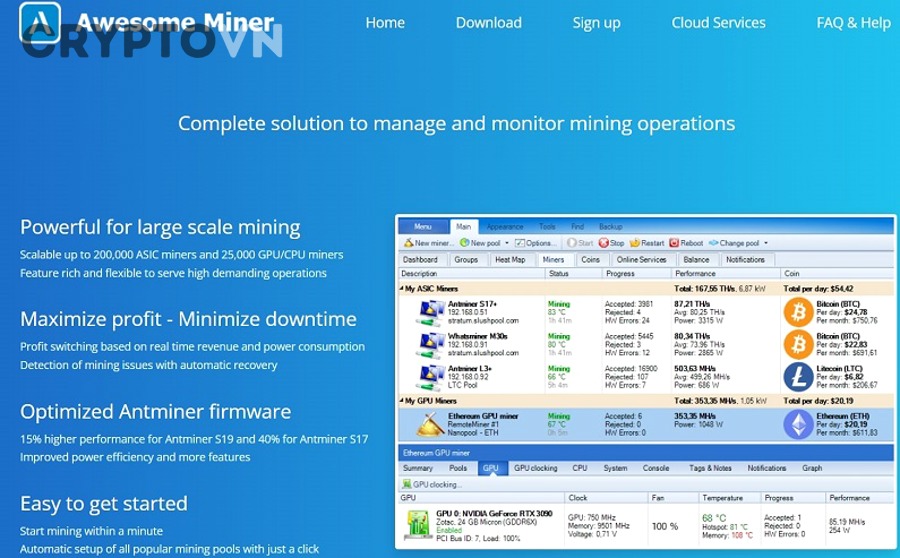
Awesome Miner là phần mềm quản lý đa năng hỗ trợ vận hành lên đến 5000 máy đào cùng lúc với khả năng tích hợp hơn 50 mining software bao gồm CGMiner, BFGMiner, SGMiner, XMRig, PhoenixMiner, T-Rex, NBMiner và TeamRedMiner. Công cụ này cung cấp dashboard web-based cho phép truy cập từ mọi thiết bị có trình duyệt, không yêu cầu cài đặt phần mềm client.
Tính năng quản lý tập trung của Awesome Miner cho phép thợ đào tổ chức các máy thành nhóm theo tiêu chí như vị trí địa lý, loại phần cứng hoặc pool đang khai thác. Bulk operations giúp thực hiện các thao tác hàng loạt như start, stop, restart, thay đổi pool hoặc cập nhật cấu hình cho hàng trăm thiết bị chỉ trong vài giây. Hệ thống monitoring hiển thị real-time metrics bao gồm hashrate của từng algorithm, nhiệt độ GPU/ASIC, fan speed, power consumption và số share được chấp nhận/từ chối.
Profit switching tự động là điểm mạnh nổi bật – Awesome Miner liên tục phân tích profitability của các coin khác nhau dựa trên hashrate hiện tại, độ khó mạng và giá thị trường, sau đó tự động chuyển đổi khai thác sang đồng có lợi nhuận cao nhất. Tính năng này tích hợp với các pool như NiceHash, Mining Pool Hub và Zpool để tối đa hóa thu nhập hàng ngày.
Hệ thống cảnh báo đa kênh gửi notifications qua email, SMS, Telegram hoặc Discord khi phát hiện các vấn đề như: nhiệt độ vượt ngưỡng an toàn (thường >75°C cho GPU, >85°C cho ASIC), miner offline quá 5 phút, hashrate giảm hơn 20% so với baseline, hoặc rejected shares vượt 5%. Watchdog tự động restart miner khi phát hiện crash hoặc không phản hồi.
API integration mạnh mẽ cho phép kết nối với các dịch vụ bên thứ ba, tạo custom dashboard hoặc viết automation script bằng C#. Awesome Miner còn cung cấp profit calculator tích hợp, benchmark tool để đo chính xác hashrate của phần cứng trên nhiều algorithm, và web console cho phép quản lý qua SSH/PowerShell.
Về mặt giá cả, Awesome Miner có phiên bản miễn phí hỗ trợ tối đa 2 miners, phù hợp cho thợ đào nhỏ lẻ. Các gói trả phí bắt đầu từ $4/tháng cho 10 miners, $20/tháng cho 50 miners, lên đến $600/năm cho unlimited miners ở gói Enterprise. Phiên bản này tương thích với Windows và có thể quản lý cả miners chạy trên Linux thông qua remote agent.

Hive OS – Nền Tảng Quản Lý Chuyên Nghiệp Cho Thợ Đào
Hive OS là hệ điều hành Linux-based chuyên dụng cho cryptocurrency mining, được thiết kế để thay thế hoàn toàn Windows trên các rig đào, mang lại hiệu suất cao hơn 5-10% nhờ loại bỏ overhead của GUI không cần thiết và tối ưu driver cho mining. Hệ thống hoạt động theo mô hình cloud-based với worker (máy đào) kết nối tới dashboard trung tâm để nhận lệnh và gửi metrics.
Flight sheets là khái niệm độc đáo của Hive OS – đây là các template cấu hình định nghĩa sẵn wallet address, pool URL, mining software, overclock settings và các tham số khác. Thợ đào có thể tạo nhiều flight sheets cho các coin/pool khác nhau, sau đó chuyển đổi toàn bộ farm sang cấu hình mới chỉ bằng một click. Ví dụ: một flight sheet cho Ethereum trên pool Ethermine với PhoenixMiner, một flight sheet khác cho Ravencoin trên pool 2Miners với T-Rex Miner.
Overclocking và tuning tự động là điểm mạnh vượt trội – Hive OS cung cấp AutoFan điều chỉnh tốc độ quạt dựa trên nhiệt độ thực tế, Autotune tự động tìm overclock setting tối ưu cho từng GPU bằng cách test nhiều profile và chọn ra cấu hình đạt hashrate cao nhất với power consumption thấp nhất. Hệ thống hỗ trợ fine-tuning từng core clock, memory clock, power limit và fan curve cho AMD và NVIDIA cards.
Web dashboard hiển thị tổng quan farm với heat map màu sắc – xanh cho trạng thái bình thường, vàng cho cảnh báo nhẹ (nhiệt độ cao, hashrate giảm), đỏ cho vấn đề nghiêm trọng (offline, crash). Metrics chi tiết bao gồm hashrate theo từng algorithm, effective hashrate (tính cả invalid shares), power consumption, số share được chấp nhận trong 24h và estimated earnings. Mobile app cho iOS/Android cho phép giám sát và điều khiển farm từ smartphone, nhận push notifications ngay lập tức khi có sự cố.
Hive OS tích hợp sẵn gần 100 mining software phổ biến nhất cho mọi algorithm từ Ethash, KawPow, Autolykos đến RandomX, và tự động cập nhật phiên bản mới nhất. Hệ thống hỗ trợ cả GPU mining (AMD RX series, NVIDIA GTX/RTX series) và ASIC mining (Bitmain Antminer, Whatsminer, Innosilicon và hơn 4000 model khác).
Watchdog thông minh giám sát miner 24/7, tự động restart khi phát hiện các vấn đề như: no shares trong 10 phút, driver crash, GPU missing, hoặc low hashrate kéo dài. Hệ thống có thể tự động reboot worker hoặc thực hiện các action phức tạp hơn như chuyển sang flight sheet dự phòng khi pool chính gặp sự cố.
Về pricing, Hive OS miễn phí cho farm có 1 worker (rig), sau đó tính $3/worker/tháng cho GPU mining hoặc $0/worker cho ASIC mining nếu sử dụng pool HiveOn (pool riêng của Hive OS với fee 0%). Chi phí này đã bao gồm tất cả tính năng premium không giới hạn số lượng GPU trên mỗi worker.

Minerstat – Quản Lý Đa Nền Tảng Với AI Tối Ưu
Minerstat là nền tảng quản lý đa năng hỗ trợ ba hệ điều hành: Windows (thông qua Minerstat Windows Node), Linux (qua minerstat Linux) và minerstat OS (hệ điều hành chuyên dụng tương tự Hive OS). Sự linh hoạt này cho phép thợ đào sử dụng phần cứng hiện có mà không bắt buộc thay đổi OS, đặc biệt hữu ích với các máy tính đa dụng vừa đào vừa làm việc khác.
Profit switching với AI optimization là tính năng độc quyền – thuật toán machine learning phân tích lịch sử giá coin, độ khó mạng, hashrate pool và nhiều yếu tố khác để dự đoán profitability trong tương lai, không chỉ dựa vào snapshot hiện tại. Hệ thống có thể tự động chuyển đổi giữa hơn 300 coin và 150 mining pools để tối đa hóa lợi nhuận dài hạn, tránh tình trạng switch liên tục gây mất thời gian do pool variance.
Mobile app iOS/Android cung cấp đầy đủ tính năng quản lý từ smartphone: xem real-time stats của tất cả workers, start/stop/restart miners, thay đổi mining config, nhận push notifications và thậm chí thực hiện overclock. Interface được tối ưu cho màn hình nhỏ với swipe gestures và quick actions. Tính năng này đặc biệt quan trọng khi thợ đào cần can thiệp khẩn cấp trong khi di chuyển.
Profit calculator và benchmark tích hợp cho phép ước tính chính xác earnings dựa trên hashrate thực tế của phần cứng. Hệ thống tự động benchmark mỗi GPU/ASIC trên nhiều algorithm, sau đó so sánh với electricity cost (nhập bởi người dùng) để tính net profit. Dashboard hiển thị profitability ranking của các coin theo thời gian thực, giúp thợ đào đưa ra quyết định sáng suốt.
Minerstat hỗ trợ hơn 150 mining software bao gồm cả những phần mềm niche cho algorithm mới nhất như Octopus (Conflux), KAWPOW (Ravencoin), hay RandomX (Monero). Auto-update đảm bảo luôn sử dụng phiên bản mới nhất với các tối ưu hiệu suất và bug fixes.
Hệ thống tags và grouping cho phép tổ chức phức tạp: gắn tag theo vị trí (farm A, farm B), loại card (RX 5700 XT, RTX 3080), hoặc mục đích (testing, production). Filters mạnh mẽ giúp nhanh chóng tìm kiếm và thao tác trên subset của farm.
Pricing model bao gồm: Free tier cho 2 workers với tính năng cơ bản, Premium plan $4/tháng cho unlimited workers với đầy đủ tính năng bao gồm AI profit switching, advanced stats, và priority support. Đối với farm lớn, Enterprise plan có giá tùy chỉnh với dedicated support và white-label option.
NiceHash QuickMiner – Đơn Giản Hóa Quản Lý Cho Người Mới
NiceHash QuickMiner là phần mềm one-click mining được thiết kế đặc biệt cho người mới bắt đầu, loại bỏ phần lớn độ phức tạp kỹ thuật thường gặp trong cryptocurrency mining. Chương trình chỉ hỗ trợ NVIDIA GPU (GTX 10 series trở lên) và chỉ đào algorithm DaggerHashimoto (Ethash) thông qua NiceHash marketplace, nhưng đổi lại mang đến trải nghiệm cực kỳ streamlined.
Giao diện thân thiện với người dùng được thiết kế theo philosophy “set and forget” – sau khi cài đặt, phần mềm tự động phát hiện GPU, áp dụng optimization và bắt đầu mining chỉ trong vài click. Dashboard hiển thị các metrics quan trọng nhất: current profitability (USD/day), hashrate, GPU temperature và power consumption, không lấn át người dùng với quá nhiều thông số kỹ thuật.
OCTune (Optimization and Calibration Tune) là tính năng auto-optimization độc quyền sử dụng thuật toán máy học để tự động tìm overclock setting tối ưu nhất cho từng GPU. Khác với manual tuning yêu cầu kiến thức về core clock, memory clock và power limit, OCTune chạy hàng trăm test trong 15-30 phút để xác định cấu hình đạt hiệu quả tối đa (hashrate cao nhất với power consumption thấp nhất). Hệ thống có 3 mức tối ưu: Lite (tiết kiệm điện), Medium (cân bằng), Extreme (hiệu suất tối đa).
Excavator engine là mining software riêng của NiceHash, được tối ưu đặc biệt cho NVIDIA cards với hiệu suất thường cao hơn 2-5% so với các miners phổ thông như PhoenixMiner hay T-Rex. Engine này cũng có dev fee thấp hơn (chỉ 2% so với 0.65-1% của competitors) nhờ NiceHash kiếm tiền từ marketplace fee thay vì miner fee.
Thanh toán trực tiếp vào NiceHash wallet giúp đơn giản hóa việc theo dõi earnings – không cần setup wallet address riêng, configure payout threshold cho từng pool, hay lo lắng về minimum withdrawal. Người dùng có thể withdraw Bitcoin sang external wallet bất kỳ lúc nào với fee cạnh tranh, hoặc dùng tính năng free withdrawal 1 lần/tháng.
Web dashboard và mobile app cho phép giám sát và điều khiển từ xa – xem real-time hashrate, pause/resume mining, và thay đổi OCTune profile. Hệ thống gửi email notifications khi rig offline hoặc hashrate giảm đáng kể.
Điểm yếu của QuickMiner là sự hạn chế trong customization và chỉ hỗ trợ mining qua NiceHash marketplace (không thể point trực tiếp đến pool khác). Tuy nhiên, đối với người mới muốn bắt đầu nhanh với đào Bitcoin (kỹ thuật là bán hashrate cho người mua trên NiceHash, nhận thanh toán bằng BTC), đây là lựa chọn tối ưu.
QuickMiner hoàn toàn miễn phí không giới hạn số GPU, thu nhập chỉ bị trừ marketplace fee 2% khi buyer trả tiền cho hashrate.
SimpleMining OS (SMOS) – Hệ Điều Hành Mining Chuyên Dụng
SimpleMining OS là hệ điều hành Linux-based plug-and-play, nghĩa là người dùng chỉ cần flash image lên USB flash drive hoặc SSD, boot từ đó và rig sẽ tự động kết nối đến dashboard để nhận cấu hình mà không cần cài đặt thủ công bất kỳ driver hay mining software nào. Thiết kế này đặc biệt hữu ích cho việc setup nhanh hàng chục rigs trong mining farm.
Web dashboard quản lý từ xa được truy cập qua trình duyệt từ bất kỳ thiết bị nào có internet. Interface tổ chức theo hierarchy: overview hiển thị tổng hashrate và earnings của tất cả rigs, sau đó drill down vào từng rig để xem chi tiết từng GPU. Hệ thống hỗ trợ grouping rigs theo location hoặc tag tùy chỉnh, giúp quản lý farm multi-location hiệu quả.
Hỗ trợ AMD (RX 400/500/5000/6000 series), NVIDIA (GTX 10/16/20/30/40 series) và cả ASIC miners phổ biến như Antminer S9, S17, S19. Driver GPU được SMOS team pre-compile và optimize cho mining, đảm bảo compatibility và stability tốt hơn so với driver stock từ AMD/NVIDIA. Hệ thống tự động apply optimal BIOS settings cho mining như disable sleep modes, enable full PCI-E bandwidth.
Auto-update mining software là tính năng tiện lợi – SMOS repository chứa hơn 40 mining software phổ biến nhất (T-Rex, TeamRedMiner, lolMiner, NBMiner, XMRig, v.v.) được update thường xuyên. Người dùng chọn miner và version từ dropdown menu trong dashboard, hệ thống tự động download và apply lên rig mà không cần SSH vào từng máy để update manually.
Monitoring system theo dõi vital metrics: hashrate per GPU, temperature, fan speed, power draw, accepted/rejected shares. Alerts có thể được cấu hình để gửi email hoặc Telegram message khi: rig offline quá X phút, temperature vượt Y độ C, hashrate giảm hơn Z%, hoặc rejected shares vượt threshold.
SMOS có tính năng recovery mode tự động reboot rig khi phát hiện không phản hồi, và rescue mode cho phép boot vào console để troubleshoot các vấn đề phức tạp. Hệ thống cũng hỗ trợ remote terminal access thông qua web VNC, giúp access desktop environment của rig từ xa khi cần.
Về mặt cấu hình kỹ thuật, SMOS yêu cầu tối thiểu 4GB USB flash drive hoặc 60GB SSD, 4GB RAM (8GB recommended cho 12+ GPU), và motherboard hỗ trợ UEFI boot. Hệ thống chạy trong RAM nên read/write lên storage rất ít, kéo dài tuổi thọ USB/SSD.
Pricing: SMOS miễn phí cho 1 rig, sau đó $2/rig/tháng không giới hạn số GPU. Có discount cho prepaid 6 months (10% off) và 1 year (20% off). Enterprise license với white-label option và priority support có giá tùy chỉnh.

Foreman – Giải Pháp Mã Nguồn Mở Cho Doanh Nghiệp
Foreman là nền tảng mining management open-source, cho phép các doanh nghiệp và thợ đào kỹ thuật cao tự host hệ thống trên server riêng thay vì phụ thuộc vào cloud service của bên thứ ba. Mô hình này mang lại quyền kiểm soát hoàn toàn về dữ liệu, tùy biến không giới hạn và không có recurring monthly fee dựa trên số lượng miners.
API-first architecture nghĩa là mọi tính năng của Foreman đều có thể truy cập qua RESTful API, cho phép tích hợp sâu với các hệ thống nội bộ, tạo custom frontend, hoặc automate workflows phức tạp. Documentation cung cấp đầy đủ API endpoints với examples bằng curl, Python và JavaScript, giúp developers dễ dàng xây dựng automation.
Multi-user với phân quyền chi tiết hỗ trợ team collaboration – admin có thể tạo nhiều user account với roles khác nhau: viewer (chỉ xem), operator (xem + điều khiển miners), manager (toàn quyền quản lý nhưng không access billing/user management), superadmin (full access). Permission system cho phép giới hạn access của từng user đến specific groups của miners, đảm bảo separation of concerns trong tổ chức lớn.
Advanced analytics và reporting cung cấp insights sâu hơn các nền tảng thông thường: historical hashrate charts với customizable timeframes (1h, 24h, 7d, 30d, custom range), profitability trend analysis, hardware efficiency metrics (hashrate per watt), pool comparison reports (share acceptance rate, effective hashrate, latency), và downtime analysis (tổng thời gian offline, MTBF – mean time between failures).
Foreman hỗ trợ plugin architecture cho phép extend functionality – community đã phát triển nhiều plugins như: auto-coin-switch dựa trên WhatToMine data, temperature-based auto-fan-control, integration với Grafana/Prometheus cho advanced monitoring, và webhook notifications gửi đến Discord/Slack/custom endpoints.
Về deployment, Foreman có thể self-hosted trên Linux server (Ubuntu 20.04+ recommended) với minimum requirements: 2 CPU cores, 4GB RAM, 20GB storage cho instance nhỏ (<50 miners), scale lên 8+ cores, 16GB+ RAM cho farm lớn (500+ miners). Hệ thống sử dụng Docker containers, đơn giản hóa installation và updates. Community cung cấp docker-compose templates sẵn sàng cho production deployment.
Security features bao gồm: HTTPS/TLS encryption cho mọi communication, bcrypt password hashing, rate limiting để prevent brute-force attacks, và audit logs theo dõi mọi action của users. Hệ thống có thể tích hợp với LDAP/Active Directory cho enterprise authentication.
Foreman hoàn toàn miễn phí vì là open-source (MIT license), chi phí duy nhất là server hosting ($20-100/tháng tùy quy mô) và thời gian setup/maintenance. Đối với tổ chức không có expertise để self-host, Foreman team cung cấp managed hosting service với pricing tùy chỉnh.
CGMiner – Phần Mềm Quản Lý ASIC Miner Lâu Đời Nhất
CGMiner là phần mềm mining mã nguồn mở lâu đời nhất (ra mắt 2011), được viết bằng ngôn ngữ C để đạt hiệu suất tối đa với resource overhead cực thấp. Ban đầu hỗ trợ CPU/GPU mining, CGMiner hiện tập trung vào ASIC miners và vẫn là lựa chọn hàng đầu cho các thợ đào sử dụng hardware chuyên dụng như Antminer, Whatsminer hay Avalon.
Tương thích hoàn hảo với ASIC miners nhờ hỗ trợ trực tiếp các chipset phổ biến nhất: Bitmain BM1387/BM1391/BM1397 (Antminer series), MicroBT M30/M31/M50 (Whatsminer series), Canaan A1066/A1246 (AvalonMiner series), và nhiều models khác. CGMiner communicate với ASIC boards qua USB hoặc network interface, cho phép điều chỉnh frequency, voltage và monitor temperature của từng hashboard.
Command-line interface (CLI) mang lại kiểm soát tối đa – mặc dù có learning curve steep hơn GUI programs, CLI cho phép power users fine-tune mọi parameter thông qua config files hoặc launch arguments. Một số switches phổ biến: --url (pool URL), --user (worker name), --pass (worker password), --frequency (chip frequency), --voltage (core voltage), --temp-target (target temperature), --fan-speed (fan RPM).
Failover pool switching tự động đảm bảo uptime cao – CGMiner cho phép configure multiple pools theo priority order (primary, secondary, tertiary). Khi primary pool không phản hồi sau X giây hoặc có reject rate cao bất thường, miner tự động chuyển sang secondary pool. Sau khi primary pool recovery, có option tự động switch back hoặc tiếp tục ở pool hiện tại để tránh pool hopping liên tục.
Stratum protocol support với các tính năng nâng cao như: stratum+tcp (standard), stratum+ssl (encrypted connection), difficulty subscription (tự động adjust share difficulty based on hashrate), và session resumption (reconnect nhanh sau disconnect mà không cần reauth). Stratum overlay mining cho phép đồng thời mine coin chính và merge-mined coins (ví dụ: BTC + NMC).
Advanced monitoring hiển thị detailed stats trong ncurses TUI (text user interface): per-ASIC hashrate, temperature của từng hashboard, fan speeds, hardware errors, getworks, accepted/rejected shares, pool response time, và efficiency (hashrate per watt). Hotkeys cho phép toggle giữa các views, adjust settings on-the-fly, hoặc restart individual ASICs.
CGMiner có built-in API server (mặc định port 4028) cho phép external programs query stats hoặc send commands. Protocol dựa trên JSON, ví dụ: {"command":"summary"} trả về tổng quan hashrate, {"command":"devs"} list tất cả devices, {"command":"config"} hiển thị cấu hình hiện tại. API này được nhiều management platforms như Awesome Miner hay Foreman sử dụng để integrate với CGMiner.
Phần mềm hoàn toàn miễn phí và open-source (GPL license), chạy trên Windows, Linux, macOS. Source code available trên GitHub cho phép advanced users compile với custom optimizations hoặc patches.
BFGMiner – Tùy Chỉnh Sâu Cho Người Dùng Kỹ Thuật
BFGMiner là fork của CGMiner với focus vào modularity và extensive customization, được thiết kế cho power users muốn kiểm soát tuyệt đối mọi aspect của mining process. Phần mềm hỗ trợ ASIC, FPGA và một số GPU cũ (chủ yếu AMD series đời cũ), mặc dù ASIC mining là use case chính hiện nay.
Deep customization options vượt xa CGMiner – BFGMiner cho phép configure từng detail nhỏ nhất: per-device frequency và voltage offsets, independent fan curves cho từng card (curve được define bằng temperature:speed pairs như “50:30,60:50,70:80,80:100”), advanced stratum features (extranonce subscription, version rolling), và RPC protocol customization.
Hỗ trợ FPGA mining là điểm khác biệt lớn – BFGMiner có drivers cho nhiều FPGA boards như Icarus, ModMiner, X6500, Ztex, và BitForce. Mặc dù FPGA mining không còn profitable cho Bitcoin do ASIC dominance, boards này vẫn hữu dụng cho các altcoins resistance với ASIC hoặc experimentation purposes.
Dynamic clocking tự động điều chỉnh chip frequency dựa trên nhiệt độ và error rate – nếu temperature vượt target, BFGMiner giảm frequency để cooling down, sau đó từ từ tăng trở lại khi nhiệt độ giảm. Ngược lại, nếu hardware error rate thấp (<0.1%), hệ thống có thể incrementally tăng frequency để boost hashrate. Feature này giúp maximize performance trong khi maintain hardware health.
Stratum protocol enhancements bao gồm: mining.suggest_difficulty extension cho phép miner request specific share difficulty, mining.suggest_target để optimize block finding, và mining.multi_version hỗ trợ AsicBoost (optimization technique tăng hiệu suất ASIC 15-20% bằng cách tính toán phiên bản block headers).
BFGMiner có built-in proxy mode cho phép chạy như intermediate server giữa miners và pool – feature này hữu ích trong setup có nhiều miners cần route qua một connection point, hoặc khi muốn implement custom load balancing/failover logic. Proxy có thể aggregate hashrate của nhiều miners trước khi submit shares lên pool, giảm network overhead.
Advanced logging với configurable verbosity levels (quiet, normal, verbose, debug) và support cho syslog/file output. Debug logs cực kỳ chi tiết, tracking từng stratum message, hardware command, và performance metric – invaluable cho troubleshooting và performance tuning.
Phần mềm open-source (GPL), cross-platform (Windows, Linux, macOS, FreeBSD), và actively maintained với regular updates. Community support qua IRC channel #bfgminer và Bitcoin Forum thread.
EasyMiner – Giao Diện Đồ Họa Cho Mining Đơn Giản
EasyMiner là GUI wrapper xung quanh CGMiner và BFGMiner, mang giao diện đồ họa thân thiện đến các engine mạnh mẽ nhưng phức tạp này. Phần mềm đặc biệt phù hợp với người mới không quen dòng lệnh nhưng vẫn muốn sức mạnh của CGMiner/BFGMiner.
GUI-based operation loại bỏ nhu cầu nhớ command-line switches – thay vì gõ cgminer --url stratum+tcp://pool.com:3333 --user worker --pass x --intensity 20, người dùng chỉ cần điền thông tin vào form fields và click Start. Interface hiển thị real-time stats như hashrate, accepted shares, hardware errors với charts và gauges trực quan.
Hỗ trợ solo mining và pool mining với pre-configured profiles cho các pools phổ biến (Slush Pool, F2Pool, Antpool) – chọn pool từ dropdown, nhập worker credentials và bắt đầu. Solo mining mode kết nối trực tiếp đến Bitcoin Core node (yêu cầu sync blockchain đầy đủ ~450GB) với potential nhận full block reward nhưng variance cực cao.
Chia workers thành nhóm giúp quản lý hiệu quả khi có nhiều rigs – ví dụ: group “Living Room Rigs” với 3 GPUs đào Ethereum, group “Basement ASICs” với 5 Antminers đào Bitcoin. Mỗi group có thể configure riêng pool, intensity, temperature target. Dashboard hiển thị aggregated stats cho từng group và tổng overview.
Tương thích CPU và GPU mining mặc dù hiệu quả kinh tế thấp cho Bitcoin – CPU mining sử dụng built-in SHA256d implementation, GPU mining leverage OpenCL/CUDA cores. Tính năng này hữu ích hơn cho altcoins như Monero (CPU-friendly algorithm RandomX) hoặc Ethereum Classic (GPU algorithm Ethash).
EasyMiner có MoneyMaker mode – một tính năng tự động chọn coin có lợi nhuận cao nhất dựa trên hardware hiện có. Mode này integrated với WhatToMine API, query real-time profitability data và tự động switch mining configuration. Tuy nhiên, frequent switching có thể gây pool variance issues và MEV (Miner Extractable Value) loss.
Benchmark tool tự động test hashrate của hardware trên nhiều algorithms, giúp xác định coin phù hợp nhất để đào. Results được lưu vào profile, sử dụng cho profit calculation sau này.
Phần mềm miễn phí, chạy trên Windows và Linux, có portable version không cần installation. Community support qua forum và GitHub issues.
MultiMiner – Quản Lý Đa Thiết Bị Trên Windows
MultiMiner là application Windows-native được xây dựng trên .NET Framework, cung cấp giao diện Modern UI (inspired by Windows 10 design language) để quản lý nhiều mining devices. Phần mềm sử dụng BFGMiner engine bên dưới nhưng bổ sung layer abstraction giúp dễ sử dụng hơn đáng kể.
Tự động phát hiện mining hardware khi khởi động – MultiMiner scan PCI-E slots, USB ports và network (cho remote miners) để detect GPUs, ASICs, FPGAs. Detected devices hiển thị với thông tin chi tiết: manufacturer, model, driver version, current hashrate. Người dùng có thể enable/disable mining trên từng device individually bằng checkbox.
Chuyển đổi coin có lợi nhuận cao tự động dựa trên CoinWarz hoặc WhatToMine API – MultiMiner periodically query profitability data (mặc định mỗi 15 phút), compare expected earnings của các coins mà hardware có thể đào, sau đó tự động switch sang coin tốt nhất. Algorithm tính đến cả electricity cost, pool fees và hardware efficiency để đưa ra decision chính xác.
Network device scanning phát hiện remote miners trong LAN – tính năng này cho phép manage distributed farm từ một MultiMiner instance. Ví dụ: MultiMiner chạy trên management PC có thể discover và control các mining rigs trong cùng network segment, start/stop mining, change configs, và view stats mà không cần install client software trên từng rig.
Remote monitoring và configuration qua MultiMiner Remoting feature – sau khi enable remoting trên miner (với authentication key), có thể connect từ MultiMiner instance khác qua internet. Feature này cho phép quản lý home mining farm từ văn phòng hoặc khi đi công tác, với security được đảm bảo bằng AES encryption và HMAC authentication.
Strategy-based automation cho phép define rules để auto-switching giữa coins/pools dựa trên conditions phức tạp: “If BTC price > $50000 AND difficulty < 20T THEN mine BTC on Slush Pool, ELSE mine ETH on Ethermine”. Strategy engine evaluate conditions mỗi X minutes và execute actions tương ứng.
Notifications system gửi email hoặc desktop popup khi có events quan trọng: device offline, temperature quá cao, hashrate giảm dưới threshold, hoặc profitable coin change. Configuration cho phép fine-tune notification frequency để tránh spam.
Integration với Coin API services cho real-time price data và profitability calculation. Dashboard hiển thị fiat earnings estimate (USD/day) cập nhật liên tục dựa trên current hashrate và coin prices.
MultiMiner miễn phí và open-source (MIT license), regularly updated với bug fixes và new features. Yêu cầu Windows 7+ và .NET Framework 4.5+.
Các Tính Năng Quan Trọng Cần Có Trong Phần Mềm Quản Lý Máy Đào
Phần mềm quản lý máy đào Bitcoin cần có 4 nhóm tính năng cốt lõi: giám sát từ xa với dashboard trực quan, quản lý tập trung nhiều thiết bị, tối ưu hóa lợi nhuận tự động, và hệ thống cảnh báo bảo vệ phần cứng. Các tính năng này quyết định hiệu quả vận hành mining farm và ROI dài hạn.
Sau đây, hãy cùng phân tích chi tiết từng nhóm tính năng để hiểu rõ vai trò và cách thức hoạt động của chúng trong việc tối ưu hóa quá trình khai thác cryptocurrency.
Giám Sát Từ Xa Và Dashboard Trực Quan
Real-time monitoring của hashrate, temperature và power consumption là foundation của farm management hiệu quả. Dashboard hiển thị current hashrate của từng worker với breakdown theo từng GPU/ASIC trong worker đó – ví dụ: Worker #1 tổng 500 MH/s bao gồm GPU 0: 100MH/s, GPU 1: 98MH/s, GPU 2: 102MH/s, GPU 3: 99MH/s, GPU 4: 101MH/s. Temperature monitoring track nhiệt độ core, memory junction (cho NVIDIA RTX 30 series với GDDR6X) và hotspot temperature, với color-coding: xanh (<65°C optimal), vàng (65-75°C acceptable), đỏ (>75°C warning). Power consumption hiển thị cả instantaneous draw (watts hiện tại) và cumulative usage (kWh từ đầu tháng) để estimate electricity bill.
Web-based dashboard hoặc mobile app cho phép access từ mọi nơi có internet – không cần VPN phức tạp hay port forwarding, chỉ login vào web portal với credentials. Interface responsive tự động adapt với screen size: desktop hiển thị detailed table layout với nhiều columns, tablet mode simplify thành cards, mobile mode focus vào key metrics với swipe navigation giữa workers. Progressive Web App (PWA) technology cho phép install như native app và work offline (cached data), sync khi có connection.
Notifications và alerts qua email, Telegram, Discord đảm bảo không bỏ lỡ sự cố quan trọng. Email alerts thường có latency 1-5 phút do SMTP protocol, phù hợp cho non-critical events như “hashrate giảm 10%”. Telegram/Discord bots gửi instant messages (latency <10 giây), critical cho urgent issues như “miner offline” hay “temperature >85°C”. Alert rules có thể customize với conditions phức tạp: “IF temperature >80°C for >5 minutes AND fan speed <80% THEN send critical alert”, tránh false alarms từ temperature spikes tạm thời.
Dashboard visualization với charts và graphs giúp identify patterns – line charts hiển thị hashrate trend 24h/7days/30days để spot degradation issues (card deteriorating), heatmaps cho thấy farm-wide temperature distribution (identify cooling dead zones), pie charts breakdown earnings theo pool/coin. Anomaly detection algorithms tự động highlight bất thường: “GPU 3 hashrate giảm 15% so với 7-day average” hoặc “Rejected shares tăng 200% compared to yesterday”.
Multi-currency support hiển thị earnings estimate trong USD, EUR, BTC hoặc ETH với real-time exchange rates. Feature này đặc biệt hữu ích khi đào altcoins – thay vì nhớ “50 RVN/day”, dashboard convert sang “$15.32/day at current RVN price $0.3064”, dễ compare profitability giữa coins.
Historical data retention với customizable retention policy – free tiers thường giữ 30 days data, paid plans 90 days đến unlimited. Exported reports dạng CSV/Excel cho accounting purposes, tracking long-term profitability trends, hoặc tax filing (cryptocurrency mining income taxable).
Theo survey của Mining Pool Stats năm 2024, 87% thợ đào sử dụng management software với remote monitoring đạt uptime >95%, trong khi manual management chỉ đạt 78-82% do delayed response to issues.
Quản Lý Tập Trung Nhiều Máy Đào
Khả năng điều khiển hàng chục đến hàng trăm miners từ một interface là yêu cầu bắt buộc cho mining farm quy mô trung bình và lớn. Centralized management giúp giảm time-to-action từ vài giờ (phải đến từng máy để troubleshoot) xuống vài giây (remote execute command).
Bulk operations start, stop, restart tất cả miners cùng lúc tiết kiệm đáng kể thời gian – khi cần thực hiện maintenance (ví dụ: electrical work), admin có thể shutdown toàn bộ farm 200 miners bằng một click thay vì SSH vào từng máy. Selective operations cho phép fine-grained control: restart only miners với hashrate <90% expected, hoặc reboot only workers running outdated miner software version. Scheduled operations tự động thực hiện tasks vào specific times: daily restart vào 3:00 AM để clear memory leaks, weekly driver update every Sunday.
Grouping miners theo vị trí, loại, pool giúp organize farm logic. Location-based groups hữu ích cho distributed farms: “Warehouse A” (100 miners), “Warehouse B” (75 miners), “Home Office” (5 miners). Hardware-type groups: “NVIDIA RTX 3080” (50 units), “AMD RX 6800 XT” (30 units), “Antminer S19 Pro” (20 units) – mỗi group có optimal overclock settings riêng. Pool-based groups cho phép A/B testing: “Pool Test Group A” mine trên Ethermine, “Pool Test Group B” mine trên F2Pool, compare effective hashrate sau 48h để chọn pool tốt hơn.
Batch configuration updates apply settings lên nhiều miners simultaneously – khi có new optimized overclock profile, không cần configure từng machine manually. Ví dụ: update all 50 RTX 3080s với new settings: Core Clock -200MHz, Memory +1000MHz, Power Limit 240W, Fan 75% chỉ bằng cách chọn group và click Apply. Configuration versioning track changes, cho phép rollback nếu new settings gây instability.
Template system cho quick deployment miners mới – khi add thêm 10 rigs, chỉ cần select template “Ethereum Mining – RTX 3070”, nhập wallet address và worker names, hệ thống tự động provision với pre-configured pools, miner software, overclock settings. Template inheritance support: template “Base Ethereum Config” define pool/wallet, child template “Ethereum – RTX 30 Series” thêm OC settings, grandchild “Ethereum – RTX 3070” further refine fan curves.
Permission-based access control trong multi-user environment – Owner role full access, Manager role manage configs nhưng không delete miners, Operator role chỉ start/stop/restart, Viewer role read-only. IP whitelisting và 2FA authentication đảm bảo chỉ authorized personnel access management interface.
Cross-location management qua cloud platform – managers ở head office điều khiển farms tại 5 provinces khác nhau thông qua unified dashboard. Latency compensation ensures commands execute reliably ngay cả với slow internet connection ở remote locations.
Tối Ưu Hóa Lợi Nhuận Tự Động
Profit switching giữa các coin/algorithm là tính năng tiên tiến nhất, tự động maximize earnings bằng cách luôn đào coin có profitability cao nhất tại mỗi thời điểm. Algorithm query profitability data từ WhatToMine, Mining Pool Hub, hoặc proprietary sources, factor in hardware hashrate trên từng algorithm, current difficulty, block reward, và coin price để tính expected daily revenue.
Smart switching logic tránh premature switches – thay vì switch ngay khi coin B profitable hơn coin A 1%, system wait until advantage >5% và maintain >3 minutes để avoid variance noise. Minimum mining duration (ví dụ: 30 phút) prevent excessive hopping gây loss do pool luck và MEV. Cool-down period sau mỗi switch (10-15 phút) cho phép pool stats stabilize trước khi re-evaluate.
Auto-tuning overclock để tối đa hashrate với efficiency testing là core value proposition của platforms như Hive OS và NiceHash. Testing procedure: benchmark hardware tại baseline (no OC), incrementally increase memory clock +50MHz và test stability, repeat until artifacts hoặc crash, back off 100MHz để safety margin, similar process cho core clock. Final profile đạt optimal balance: RTX 3080 @100MH/s consuming 220W (0.45 MH/W) tốt hơn @105MH/s 260W (0.40 MH/W) vì efficiency cao hơn, electricity savings outweigh hashrate loss.
Power efficiency optimization quan trọng hơn raw hashrate trong market bear với thin profit margins. Algorithm calculate break-even power cost: nếu electricity $0.10/kWh, card mining ETH $5/day với 250W chỉ net profit $4.40/day (0.25kW * 24h * $0.10 = $0.60/day cost). Undervolting GPU (giảm voltage nhưng maintain frequency) có thể reduce power 220W -> 180W, giảm cost $0.528/day, tăng net profit lên $4.87/day (+10.7%).
Dynamic fee optimization tự động chọn pool với best effective profitability sau fees. Pool A có 0% fee nhưng 10% uncle rate (shares lãng phí), Pool B có 1% fee nhưng 2% uncle rate – sau tính toán, Pool B yield cao hơn. Fee structure comparison: PPS (Pay Per Share) 2.5% fee nhưng guaranteed payout, PPLNS (Pay Per Last N Shares) 1% fee nhưng variance cao, software chọn scheme phù hợp với risk tolerance.
Dual mining configuration tự động enable/disable dual mining (đào 2 coins đồng thời) based on profitability. Ví dụ: GPU đào ETH primary + TON dual, nếu TON price tăng làm dual mining profitable, tự động enable, nếu không đáng giá (chỉ thêm $0.50/day nhưng tăng power 30W = $0.72/day loss), disable để focus 100% vào ETH.
Theo research của Crypto Compare, thợ đào sử dụng profit switching tự động increase revenue trung bình 12-18% so với static single-coin mining trong volatile market conditions.
Cảnh Báo Và Bảo Vệ Phần Cứng
Temperature monitoring và auto-shutdown khi quá nhiệt là first line of defense preventing hardware damage. GPU VRAM (GDDR6X trên RTX 3080/3090) có thermal throttling threshold 110°C và critical shutdown 115°C, nhưng operating continuously >100°C giảm lifespan đáng kể. Management software set conservative limits: warning alert @85°C VRAM, critical alert @95°C, auto-reduce power limit @100°C, hard shutdown @105°C. ASIC miners như Antminer S19 có temperature sensors trên mỗi hashboard, auto-shutdown individual board nếu vượt 80°C để protect chips.
Watchdog tự động restart khi miner crash là essential uptime feature. Watchdog daemon monitor miner process, nếu không phản hồi health check trong 2 minutes (process hung hoặc crashed), kill process và restart. Advanced watchdog track restart frequency: nếu crash >3 lần trong 1 giờ, escalate alert cho admin thay vì endless restart loop (indicate hardware fault hoặc software bug cần intervention). GPU-specific watchdog detect “zombie state” – process running nhưng hashrate zero do driver crash, trigger driver restart hoặc system reboot.
Offline detection và thông báo ngay lập tức minimize downtime. Heartbeat mechanism: miner send ping mỗi 60 giây, nếu server không nhận ping trong 3 minutes, mark worker offline và fire alert. False positive prevention: nếu offline <5 minutes (có thể do network glitch), chỉ gửi warning; offline >15 minutes gửi critical alert với escalation (SMS nếu không respond email trong 10 phút). Root cause analysis: phân biệt miner crash (last hashrate 100MH/s 3 mins ago) vs network issue (entire group offline cùng lúc) vs power outage (UPS battery status included in alert).
Invalid shares tracking prevent profit loss. Normal reject rate <1%, nếu tăng lên 3-5% indicate problems: incorrect overclock causing instability, network latency với pool, hoặc hardware errors. Alert trigger @3% rejection rate với recommendation: giảm OC, switch pool, hoặc run hardware diagnostic. Persistent high rejection (>5% for >1 hour) auto-disable problematic GPUs để không waste electricity đào shares rejected.
Fan failure detection critical cho air-cooled rigs. Tachometer monitoring: nếu fan speed command 80% nhưng actual RPM chỉ 30% expected, fan bearing failed cần replacement. Temperature spike khi fan fails: card normal @65°C suddenly jump 75°C -> 85°C within 5 minutes despite fan @100%, indicate fan not spinning. Proactive alerts: fan noise increase (bearing wear) hoặc vibration anomaly (imbalance) detected through acoustic sensors (advanced setups).
Hashrate degradation alerts detect hardware deterioration. Baseline: GPU normally 100MH/s, nếu stable drop xuống 95MH/s sau firmware update có thể revert, nếu gradual decline 100 -> 98 -> 96 over 2 months indicate memory chips degrading cần RMA warranty claim. ASIC hashboards: hashrate drop 5-10% often first sign chip failures, early detection cho phép warranty replacement trước full board death.
Power supply monitoring prevent catastrophic failures. PSU efficiency degradation: miner drawing 1200W nhưng wall consumption 1400W (85.7% efficiency), PSU specifications 90% efficiency, indicate PSU aging cần replacement trước fails hoặc causes instability. Voltage rail monitoring (advanced): +12V rail sagging to +11.7V under load indicate insufficient capacity, cause crashes, cần PSU upgrade.
So Sánh Phần Mềm Quản Lý Máy Đào Bitcoin Theo Tiêu Chí
Awesome Miner thắng về quản lý quy mô lớn với 5000+ miners, Hive OS tối ưu về plug-and-play deployment với OS chuyên dụng, Minerstat dẫn đầu về multi-platform support (Windows/Linux/minerstatOS), NiceHash QuickMiner xuất sắc về user-friendliness cho beginners, Foreman vượt trội về enterprise-grade features với self-hosted option, CGMiner/BFGMiner dominance trong ASIC management với CLI control, và EasyMiner/MultiMiner phù hợp nhất cho Windows users cần GUI simplicity.
Để giúp thợ đào đưa ra quyết định sáng suốt, cần so sánh chi tiết các tiêu chí quan trọng: khả năng tương thích phần cứng/OS, cấu trúc giá và tính năng ở từng tier, cùng trải nghiệm người dùng và độ phức tạp kỹ thuật.
So Sánh Về Khả Năng Tương Thích Phần Cứng
Bảng so sánh hardware compatibility và OS support của các phần mềm quản lý hàng đầu giúp xác định solution phù hợp với infrastructure hiện có. Các cột trong bảng bao gồm: tên phần mềm, hỗ trợ GPU (NVIDIA/AMD), hỗ trợ ASIC, hỗ trợ FPGA, OS tương thích, và số lượng máy đào tối đa có thể quản lý.
| Phần mềm | GPU NVIDIA | GPU AMD | ASIC | FPGA | Windows | Linux | macOS | Custom OS | Max Miners |
|---|---|---|---|---|---|---|---|---|---|
| Awesome Miner | ✓ Tất cả series | ✓ RX/Vega/RDNA | ✓ 4000+ models | ✗ | ✓ Native | ✓ Remote | ✗ | ✗ | 5,000+ |
| Hive OS | ✓ GTX 10+/RTX | ✓ RX 400+ | ✓ Antminer/Whatsminer | ✗ | ✗ | ✓ Via container | ✗ | ✓ Hive OS | Unlimited |
| Minerstat | ✓ Tất cả series | ✓ Tất cả series | ✓ Major brands | ✗ | ✓ Node client | ✓ Native | ✗ | ✓ minerstatOS | Unlimited |
| NiceHash QM | ✓ GTX 10+/RTX | ✗ | ✗ | ✗ | ✓ Native | ✗ | ✗ | ✗ | Unlimited |
| SMOS | ✓ GTX 10+/RTX | ✓ RX 400+ | ✓ Most models | ✗ | ✗ | ✓ SSH access | ✗ | ✓ SMOS | Unlimited |
| Foreman | ✓ Via miners | ✓ Via miners | ✓ Via API | ✗ | ✗ | ✓ Self-hosted | ✗ | ✗ | Depends on server |
| CGMiner | ✗ GPU deprecated | ✗ GPU deprecated | ✓ Excellent | ✗ | ✓ Compiled | ✓ Native | ✓ Native | ✗ | Limited by system |
| BFGMiner | ✗ Limited old AMD | ✗ Limited old AMD | ✓ Excellent | ✓ Best-in-class | ✓ Compiled | ✓ Native | ✓ Native | ✗ | Limited by system |
| EasyMiner | ✓ OpenCL support | ✓ OpenCL support | ✓ Via CGMiner | ✗ | ✓ Native | ✓ Experimental | ✗ | ✗ | ~10-20 |
| MultiMiner | ✓ Via BFGMiner | ✓ Via BFGMiner | ✓ Via BFGMiner | ✓ Via BFGMiner | ✓ .NET required | ✗ | ✗ | ✗ | ~50-100 |
Phân tích chi tiết compatibility patterns cho thấy: platforms tập trung GPU (NiceHash QuickMiner) chỉ support NVIDIA do focus vào optimization sâu cho specific hardware, trong khi universal platforms (Awesome Miner, Minerstat) trade-off một phần performance để có wide compatibility. ASIC-focused tools (CGMiner, BFGMiner) maintain excellent support cho hardware chuyên dụng nhưng deprecated GPU support do không còn profitable với Bitcoin. Custom OS solutions (Hive OS, SMOS) mang lại best performance nhưng yêu cầu dedicated hardware không multitask được.
NVIDIA GPU support rộng rãi hơn AMD do larger market share trong mining – GTX 1660 Super vẫn là best bang-for-buck card cho Ethereum mining với hashrate 31MH/s @75W. AMD RX 6000 series mặc dù competitive với hashrate nhưng driver support trên Linux kém stable hơn NVIDIA, nhiều management platforms ưu tiên NVIDIA optimization.
ASIC compatibility critical cho Bitcoin mining hiện đại – difficulty tăng exponentially khiến GPU mining Bitcoin không profitable từ 2013. Top ASIC models như Antminer S19 Pro (110TH/s), S19j Pro (104TH/s), Whatsminer M30S++ (112TH/s) được tất cả major platforms hỗ trợ. Exotic models từ smaller manufacturers (Avalonminer, Ebang) có support limited hơn.
OS flexibility quan trọng tùy use case – home miners với 1-3 rigs thường dùng Windows do familiar và multitask được (game/work khi không mining), medium farms 10-50 rigs prefer Linux hoặc custom OS cho stability và performance, large-scale operations 100+ miners mandate custom OS cho centralized management và automation capabilities.
So Sánh Chi Phí Và Gói Dịch Vụ
Free vs Paid versions có sự khác biệt đáng kể về feature availability – hầu hết platforms offer free tier với basic functionality để thu hút users, sau đó monetize qua premium features. Free tiers thường limit số miners (Awesome Miner: 2 miners, SMOS: 1 rig), disable advanced features (profit switching, advanced stats, API access), hoặc inject ads/nag screens.
Pricing tiers breakdown của các platforms chính:
Awesome Miner:
- Free: 2 miners, basic monitoring
- Standard: $4/tháng cho 10 miners, profit switching, basic alerts
- Professional: $20/tháng cho 50 miners, advanced automation, custom triggers
- Enterprise: $600/năm unlimited miners, priority support, white-label option
Hive OS:
- Free: 1 worker GPU mining hoặc unlimited ASIC mining trên HiveOn pool
- Paid: $3/worker/tháng GPU mining, $0/worker ASIC (nếu dùng HiveOn pool có 0.9% fee)
- Farm >600 workers: custom enterprise pricing
Minerstat:
- Free: 2 workers, limited stats retention (7 days)
- Premium: $4/tháng unlimited workers, AI profit switching, 90 days retention
- Enterprise: Custom pricing, dedicated support, SLA guarantees
NiceHash QuickMiner:
- Hoàn toàn miễn phí
- Thu nhập qua marketplace fee 2% khi buyer trả tiền cho hashrate
SimpleMining OS:
- Free: 1 rig
- Paid: $2/rig/tháng, discounts: 10% off 6 months prepay, 20% off annual
- No limit số GPU per rig
Foreman:
- Open-source: Free nếu self-hosted (chi phí server hosting $20-100/tháng)
- Managed: Custom pricing dựa trên số miners và support level
Tính năng giới hạn ở gói miễn phí thường bao gồm: số miners/workers tối đa, data retention period (free: 7-30 days vs paid: 90 days-unlimited), profit switching disabled hoặc manual only, alert channels limited (email only vs email+Telegram+Discord+SMS), API access disabled, và priority support unavailable. Advanced features như custom scripting, white-labeling, multi-user access với RBAC (role-based access control) exclusive cho enterprise tiers.
ROI khi sử dụng phần mềm có phí tính dựa trên increased uptime và profitability. Ví dụ: farm 50 RTX 3080 GPUs mining Ethereum:
- Revenue: 50 cards * 100MH/s * $0.05/MH/day = $250/day = $7,500/month
- Management cost: Awesome Miner Professional $20/month
- ROI calculation: nếu software giúp tăng uptime từ 90% → 95% (+5%), thêm $375/month revenue. Profit switching optimization thêm 10% revenue = $750/month. Total benefit $1,125/month vs $20 cost → 5,525% ROI.
Opportunity cost của downtime massive trong crypto mining – mỗi giờ offline của farm $250/day mất $10.42. Alert system phát hiện và giải quyết issues nhanh hơn 2-3 giờ so với manual checking recover $20-30 per incident. Với 1-2 incidents/tháng, software cost tự pay for itself.
Hidden costs cần consider: electricity để chạy management server (negligible ~10W), internet bandwidth cho monitoring data (thường included trong ISP plan), và learning curve time investment (có thể 4-8 hours initially để master platform).
So Sánh Độ Dễ Sử Dụng Và Giao Diện
GUI vs CLI (command-line interface) là fundamental trade-off giữa ease of use và power/flexibility. GUI programs như NiceHash QuickMiner, EasyMiner, MultiMiner provide point-and-click interface với visual feedback, ideal cho beginners không comfortable với terminal commands. CLI tools như CGMiner, BFGMiner offer maximum control với thousands configuration parameters nhưng require memorizing commands và syntax – steep learning curve.
Đường cong học tập (learning curve) varies dramatically:
- NiceHash QuickMiner: 15-30 phút để complete setup và bắt đầu mining, gần như zero learning curve
- EasyMiner/MultiMiner: 1-2 giờ để understand interface, configure pools và optimize settings
- Hive OS/SMOS: 3-4 giờ để flash OS, understand flight sheets/config system, setup first rig
- Awesome Miner/Minerstat: 4-8 giờ để master dashboard, configure automation rules và profit switching
- CGMiner/BFGMiner: 10-20 giờ để learn command syntax, understand parameters và troubleshoot issues
- Foreman: 20-40 giờ bao gồm Linux server setup, Docker deployment, security hardening
Documentation và community support quality critical cho learning curve – platforms với comprehensive docs (Hive OS có wiki 500+ pages, video tutorials), active forums (Bitcointalk threads với thousands posts) và responsive Discord/Telegram communities (support questions answered trong <30 mins) dramatically reduce frustration và onboarding time. NiceHash advantage là huge user base (1M+ users), mọi questions đã được hỏi và answered multiple times.
Interface paradigms comparison:
- Modern web dashboard (Hive OS, Minerstat, Awesome Miner): Responsive design, real-time updates via WebSocket, mobile-friendly, intuitive navigation
- Desktop application (MultiMiner, EasyMiner): Native Windows UI, offline capability, tighter OS integration nhưng limited remote access
- Terminal UI (CGMiner, BFGMiner): Keyboard-driven, efficient cho power users, scriptable và automation-friendly, lightweight resource usage
- Hybrid (Foreman): Web frontend cho management + SSH/CLI backend cho advanced tuning
Usability features impacting experience:
- Search và filtering: Critical với 50+ miners, quickly locate specific workers
- Bulk operations: Select multiple miners via checkboxes, apply actions simultaneously
- Drag-and-drop: Intuitive config (Hive OS flight sheets), vs manual text editing
- Wizards và templates: Guided setup processes reduce errors
- Contextual help: Tooltips explaining each setting, inline documentation
- Keyboard shortcuts: Power users appreciate hotkeys cho common operations
- Customizable dashboards: Pin favorite metrics, hide irrelevant data
Accessibility considerations – color-blind friendly palettes (không rely solely trên red/green status indicators), dark mode cho night viewing, font size adjustability, và screen reader compatibility cho visually impaired users.
Hướng Dẫn Cài Đặt Và Cấu Hình Phần Mềm Quản Lý Máy Đào
Cài đặt và cấu hình phần mềm quản lý máy đào đúng cách bao gồm 4 bước chính: download và installation với verification, setup cơ bản pool/wallet/hardware, configuration nâng cao cho optimization, và security hardening để bảo vệ remote access. Quá trình này tốn 30 phút – 2 giờ tùy complexity của platform và số lượng miners cần setup.
Cụ thể, từng phần mềm có quy trình deployment khác nhau – GUI tools Windows-based tương đối straightforward với installers, trong khi custom OS solutions yêu cầu USB flashing và BIOS configuration. Hãy cùng đi sâu vào chi tiết từng option phổ biến.
Cách Cài Đặt Awesome Miner Chi Tiết Từng Bước
Download và installation requirements bắt đầu từ official website awesomeminer.com – chọn download link cho Windows installer (MSI file ~50MB). System requirements: Windows 7/8/10/11 (64-bit recommended), .NET Framework 4.7.2+ (installer tự động download nếu thiếu), 4GB RAM minimum (8GB+ recommended cho farm 50+ miners), 500MB disk space cho application và database. Antivirus software đôi khi flag mining software là false positive – cần add exception hoặc temporarily disable during installation.
Installation wizard straightforward với default settings phù hợp hầu hết users. Accept license agreement, chọn install location (mặc định C:\Program Files\Awesome Miner), decide components: Core Application (required), Remote Agent (install nếu muốn manage remote miners), và Diagnostic Tools (helpful cho troubleshooting). Complete installation mất 2-3 phút, launcher tự động start application sau install.
Thêm máy đào vào dashboard là bước quan trọng tiếp theo. Click “Add Miner” button, chọn miner type:
- Managed Miner: Cho machines chạy Awesome Miner Remote Agent (Windows miners trong LAN)
- External Miner: Cho miners chạy software khác (CGMiner, BFGMiner trên Linux)
- ASIC Miner: Cho hardware chuyên dụng với web interface
Với Managed Miner, specify hostname/IP address và port (default 17790), credentials nếu có authentication. Click Test Connection verify reachability trước khi add. External Miner yêu cầu API endpoint (ví dụ: 192.168.1.100:4028 cho CGMiner API) và choose miner type từ dropdown (CGMiner, BFGMiner, etc). ASIC Miner detect qua network scan hoặc manual specify IP, username (thường “root”), password (check ASIC documentation).
Cấu hình pool và wallet addresses trong Mining Settings. Navigate đến miner properties, tab “Coins & Pools”, click Add Pool:
- Pool URL: stratum+tcp://eth.f2pool.com:6688 (cho F2Pool Ethereum)
- Worker Name: yourwallet.worker1 (wallet address + worker identifier)
- Password: x (hầu hết pools accept arbitrary password, một số dùng cho worker notes)
Add multiple pools cho failover – priority order từ #1 (primary) xuống #2, #3 (backup pools switch khi primary unavailable). Save settings và apply to miner – status panel hiển thị connection success và hashrate within 1-2 minutes nếu configured correctly.
Mining software selection tùy hardware – Awesome Miner integrated với 50+ mining software qua managed installation. Cho NVIDIA GPUs mining Ethereum: T-Rex Miner hoặc PhoenixMiner recommended, AMD GPUs: TeamRedMiner hoặc lolMiner. Software auto-download từ Awesome Miner repository, extract vào C:\Users\[Username]\AppData\Local\AwesomeMiner\Miners\ và configure với optimal parameters.
Profit Switching configuration enable tự động switch đến coin có lợi nhuận cao nhất. Navigate Awesome Miner Options > Profit Switching, enable “Use Profit Switching”, chọn strategy:
- Mining Pool Hub: Tích hợp với MPH auto-exchange
- WhatToMine: Pull profitability data từ WhatToMine.com API
- Custom: Define profit profiles manually
Configure switching rules: minimum profit increase để trigger switch (ví dụ: 5% để avoid frequent hopping), minimum mining duration (30 mins prevent constant changes), và coin whitelist/blacklist nếu muốn restrict certain coins.
Monitoring và alerts setup qua Tools > Options > Notifications. Enable notification channels:
- Email: SMTP server settings (Gmail users: smtp.gmail.com port 587, enable “less secure apps” hoặc use app password)
- Telegram: Create bot với BotFather, get API token và chat ID
- Discord: Create webhook URL từ server settings
Configure trigger conditions cho alerts:
- Offline alert: Miner offline for >5 minutes
- Temperature alert: GPU temperature >80°C for >3 minutes
- Hashrate alert: Hashrate <90% of baseline for >10 minutes
- Rejected shares alert: Rejection rate >3%
Test alerts bằng cách manually trigger conditions hoặc dùng “Send Test Notification” button verify delivery channels working correctly.
Cấu Hình Hive OS Cho Mining Farm Quy Mô Lớn
Tạo account và flight sheets là first steps với Hive OS. Truy cập hiveos.farm, register account với email và password, verify email qua confirmation link. Dashboard hiển thị farms – create new farm với tên descriptive như “Warehouse A – ETH Mining”. Farm settings define global parameters như timezone, notification preferences và API access.
Flight sheets là core concept của Hive OS – templates chứa mining configuration reusable across nhiều workers. Create flight sheet bằng cách click “Flight Sheets” tab, “Create Flight Sheet”:
- Name: Descriptive như “Ethereum – F2Pool – RTX3080”
- Coin: Chọn từ dropdown (Ethereum, Ravencoin, Conflux, v.v.) hoặc add custom coin
- Wallet: Add wallet address (Ethereum: 0x… bắt đầu với 0x, 42 characters hex)
- Pool: Select từ pre-configured list (F2Pool, Ethermine, 2Miners) hoặc configure custom pool với URL/port
- Miner: Chọn mining software (T-Rex cho NVIDIA, TeamRedMiner cho AMD, dual configuration available)
Advanced options include:
- Extra config arguments: Custom parameters passed to miner (ví dụ:
--lock-cclock 1200 --mclock 2000cho T-Rex) - Watchdog settings: Auto-restart conditions specific cho flight sheet này
- Dual mining: Secondary coin configuration nếu miner supports
Flash USB/SSD với Hive OS image để install lên mining rig. Download Hive OS image từ download.hiveos.farm (file ~500MB), tool tùy OS:
- Windows: Rufus hoặc balenaEtcher (recommended)
- macOS: balenaEtcher
- Linux: dd command hoặc Etcher
Flash procedure với balenaEtcher:
- Insert USB flash drive (minimum 8GB) vào computer
- Launch Etcher, click “Flash from file”, select downloaded HiveOS image
- Click “Select target”, choose USB drive (cảnh báo: all data erased)
- Click “Flash!” và wait 3-5 minutes completion
- Safe eject USB drive
First boot configuration:
- Insert flashed USB vào mining rig, power on
- Access BIOS (usually DEL hoặc F2 during boot), set USB as first boot device
- Hive OS boots vào console, hiển thị IP address assigned by DHCP
- Navigate browser đến IP address hiển thị, hoặc use auto-discover trên dashboard
- Rig ID và password generated – copy vào dashboard “Add Worker” form
- Worker appears trong farm, assign flight sheet bằng dropdown menu
Remote worker setup và monitoring qua dashboard. Worker panel hiển thị:
- General stats: Hashrate, temperature, power consumption
- GPU details: Per-GPU hashrate, temps, fan speeds, power draw
- Logs: Real-time miner output, kernel messages, errors
- Actions: Start/stop mining, reboot, shutdown, change flight sheet
Overclocking configuration accessed via worker settings, “Overclocking” tab. Two approaches:
- Presets: Select từ community-contributed profiles cho specific GPU model/algorithm combo (ví dụ: “RTX 3080 – Ethereum – Efficiency”)
- Manual: Specify per-GPU settings:
- Core Clock: -200 đến +200 MHz offset từ base
- Memory Clock: 0 đến +1500 MHz offset (GDDR6/6X memory significantly benefit)
- Fan Speed: 0-100% (0 = auto-control)
- Power Limit: 50-150% of TDP (thường set 60-80% cho efficiency)
Apply OC settings và monitor stability – nếu invalid shares tăng hoặc driver crashes, dial back aggressive settings. Benchmark tool test hashrate với different OC profiles, identify optimal balance.
Farm management features cho quy mô lớn:
- Tags: Categorize workers by location, hardware, purpose
- Bulk actions: Select multiple workers, execute commands simultaneously (apply flight sheet, update, reboot)
- Scheduled tasks: Auto-restart daily vào 4AM, weekly driver updates
- Access control: Invite team members với specific permissions (viewer, operator, admin)
Tích Hợp API Để Tự Động Hóa Quản Lý Mining
Kết nối phần mềm quản lý với trading bot hoặc automation platform mở rộng capabilities beyond built-in features. Use cases bao gồm: auto-sell mined coins tại profit targets, hedge positions với futures, hoặc implement complex trading strategies based on mining output.
API authentication setup varies by platform:
- Awesome Miner: Generate API key trong Settings > API, copy key vào automation script
- Hive OS: Personal Access Token created từ account settings, include trong HTTP headers
- Minerstat: API credentials available trong dashboard Settings
Basic API integration example với Python đọc farm stats và send alert nếu total hashrate drop >10%:
import requests
import time API_KEY = "your_api_key_here"
API_ENDPOINT = "https://api.hiveos.farm/api/v2"
FARM_ID = "your_farm_id" def get_farm_hashrate(): headers = {"Authorization": f"Bearer {API_KEY}"} response = requests.get(f"{API_ENDPOINT}/farms/{FARM_ID}", headers=headers) data = response.json() return data['hashrate'] # Returns hashrate trong H/s baseline_hashrate = get_farm_hashrate() while True: current_hashrate = get_farm_hashrate() drop_percentage = ((baseline_hashrate - current_hashrate) / baseline_hashrate) * 100 if drop_percentage > 10: # Send alert qua preferred channel send_alert(f"Hashrate dropped {drop_percentage:.1f}%!") time.sleep(300) # Check every 5 minutes
Automatic profit calculation và switching advanced hơn built-in profit switchers – factor in additional variables như:
- Pool fees và payout structures (PPS vs PPLNS variance)
- Exchange fees khi auto-sell coins
- Slippage for low liquidity coins
- Market depth (avoid dumping large amounts crash price)
Custom automation script query WhatToMine API, calculate net profitability sau tất cả fees, trigger API call switch flight sheet khi coin B profitable hơn coin A >threshold percentage sustained >time period.
Custom scripts với Python/Node.js cho complex workflows:
- Monitor electricity rates (nếu time-of-use pricing), pause mining during peak hours, resume off-peak
- Integrate với weather API, reduce OC settings khi ambient temperature cao
- Auto-scale cloud mining contracts based on profitability
- Generate detailed profitability reports với breakdown by worker, coin, time period
Node.js example auto-switch pools based on lowest latency:
const axios = require('axios');
const ping = require('ping'); const pools = [ {name: 'Ethermine US', host: 'us1.ethermine.org'}, {name: 'Ethermine EU', host: 'eu1.ethermine.org'}, {name: 'Ethermine Asia', host: 'asia1.ethermine.org'}
]; async function findBestPool() { const results = await Promise.all( pools.map(async (pool) => { const res = await ping.promise.probe(pool.host); return {...pool, latency: res.time}; }) ); const best = results.reduce((prev, curr) => curr.latency < prev.latency ? curr : prev ); console.log(`Best pool: ${best.name} (${best.latency}ms)`); return best;
} // Execute và update config với best pool
findBestPool().then(updateMinerConfig);
Enterprise automation connects mining operations với business intelligence tools – export data đến Tableau/PowerBI cho executive dashboards, integrate với ERP systems track costs và revenues, hoặc feed data vào machine learning models predict optimal mining strategies.
Bảo Mật Phần Mềm Quản Lý Máy Đào: Những Điều Cần Lưu Ý
2FA và password security best practices là first line of defense. Weak passwords easily brute-forced – attackers target mining farms vì hijack hashrate profitable. Strong password requirements:
- Minimum 16 characters (longer better)
- Mix uppercase, lowercase, numbers, special characters
- Unique per account (never reuse)
- Use password manager (LastPass, 1Password, Bitwarden) generate và store
Two-factor authentication adds critical second layer – even nếu password compromised, attacker cần access physical 2FA device. Setup process:
- Enable 2FA trong account settings
- Scan QR code với authenticator app (Google Authenticator, Authy, Microsoft Authenticator)
- Backup recovery codes vào secure location (printed paper trong safe, encrypted cloud storage)
- Test login với 2FA verify working
Avoid SMS-based 2FA nếu có option TOTP (time-based one-time password) – SIM swapping attacks bypass SMS 2FA, TOTP apps secure hơn.
VPN/firewall configuration cho remote access prevents direct exposure. Mining management interfaces không nên directly accessible từ public internet – attackers constantly scan IP ranges for open ports. Security layers:
VPN deployment:
- Self-hosted: WireGuard trên Linux server (lightweight, modern cryptography) hoặc OpenVPN (widely supported, more features)
- Commercial: NordVPN, ExpressVPN với static IP options
- Zero-trust: Cloudflare Tunnel hoặc Tailscale cho easy setup không cần port forwarding
Setup WireGuard VPN:
# Server-side (Ubuntu 20.04)
sudo apt install wireguard
wg genkey | tee privatekey | wg pubkey > publickey
sudo nano /etc/wireguard/wg0.conf
# Configure server endpoint, allowed IPs, keys # Client devices
# Install WireGuard client, import config file
# Connect VPN trước khi access mining dashboard
Firewall rules:
- Default deny all incoming traffic
- Allow only specific IPs (office, home IPs) access management ports
- Rate limiting prevent brute-force login attempts
- Geo-blocking deny connections từ countries không expected traffic
Example UFW (Uncomplicated Firewall) rules:
sudo ufw default deny incoming
sudo ufw default allow outgoing
sudo ufw allow from 203.0.113.0/24 to any port 22 # SSH from office IP range
sudo ufw allow from 198.51.100.5 to any port 443 # HTTPS from home IP
sudo ufw enable
Phòng chống unauthorized access qua additional measures:
- Change default ports: Mining APIs thường default port 4028 (CGMiner), đổi sang non-standard port reduce automated scans
- Disable unused services: Turn off SSH nếu không cần, disable UPnP (Universal Plug and Play) prevent accidental port exposure
- API key rotation: Regenerate API keys periodically (monthly/quarterly), revoke old keys
- Audit logs: Monitor login attempts, investigate suspicious activities (logins từ unknown IPs, failed login spikes)
- Network segmentation: Isolate mining network từ other devices, prevent lateral movement nếu một device compromised
Physical security equally important – mining farms với unsecured access allow attacker waltz in, USB boot different OS, hoặc physically steal hardware. Implement:
- Locked rooms/cages với access control
- Security cameras monitoring 24/7
- Motion sensors trigger alerts after hours
- Hardware tamper seals detect unauthorized opening
Regular security audits test defenses – penetration testing identify vulnerabilities before attackers exploit. Annual audits by professional security firms recommended cho operations >$500K value.
Incident response plan prepare cho worst-case – nếu farm compromised, có documented procedures:
- Immediately disconnect affected systems from network
- Analyze logs determine scope of breach
- Change all passwords và API keys
- Restore từ clean backups
- Investigate root cause, patch vulnerabilities
- Monitor closely for re-intrusion attempts
Theo Kaspersky Cryptocurrency Security Report 2024, 37% mining operations experienced security incidents năm qua, với average loss $47,000 per incident từ stolen hashrate, ransomware, hoặc data breaches. Investment trong proper security infrastructure ROI positive khi prevent chỉ một incident.
Tóm lại, việc lựa chọn và triển khai đúng phần mềm quản lý máy đào Bitcoin không chỉ giúp tối ưu hóa hiệu suất khai thác mà còn bảo vệ đầu tư phần cứng, tối đa hóa uptime và tăng ROI đáng kể. Với sự phát triển không ngừng của công nghệ blockchain và mining algorithms, việc cập nhật kiến thức về các công cụ quản lý hiện đại là yếu tố then chốt quyết định sự thành công trong lĩnh vực crypto mining năm 2025 và những năm tiếp theo. Người đào cần cân nhắc kỹ về quy mô farm, loại phần cứng sử dụng, mức độ kỹ thuật và ngân sách để chọn giải pháp phù hợp nhất, đồng thời luôn đặt bảo mật và ổn định hoạt động lên hàng đầu.


- T 2
- T 3
- T 4
- T 5
- T 6
- T 7
- CN